Nano Banana Pro
  • Home
  • Reviews
  • Assets
  • Pricing
AI Tools
AI ToolsLine Art ColorizerAI Comic GeneratorPhoto to Anime GeneratorLuxury Car PortraitAI Consistent Character GeneratorPhoto RestorationRemove BackgroundImage UpscalerAI ID PhotoAnime FilterManga Filter3D CartoonAI OutpaintingSketch to ImageWatermark RemoverPortrait FilterPixel ArtManga ColorizerManga TranslatorManga CleanerColoring Page GeneratorPersonalized Story IllustrationsChildren’s Book IllustrationImage to Line ArtGender SwapBody EditorSketch to 3DBald Filter1990s PortraitBuzz CutProfessional HeadshotGrey HairAI Studio PortraitY2K Style2D to 3DRemove WatermarkObject EraserOil PaintingWatercolorNeon GlowCyberpunkVaporwaveAI Tattoo GeneratorAI Worksheet for KidsAI Action FigureAI Movie PosterAI HairstyleYounger SelfAI Product Photo GeneratorAI ClaymationAI Travel Photo GridAI Double-Exposure Travel Poster GeneratorAI Mini Me GeneratorFunny Bad Drawing AIK-Beauty Glass-Skin Photo EffectRainy-Window AI PortraitCafé-Style AI PhotoAI Virtual Room StagingAI Landscape DesignAI Logo GeneratorAI Packaging DesignAI Sticker GeneratorPlush Toy Design Sheet GeneratorPhoto Mishap GeneratorCharacter Nail Design Generator
Nano Banana ProNano Banana Pro

AI Pixel Art

AI Toolbox
AI Pixel Art Conversion

Upload Assets

Drag & drop reference images here or browse files

SUPPORTS: JPG, JPEG, PNG, WEBP • MAX 30 MB

Auto

AI Pixel Art

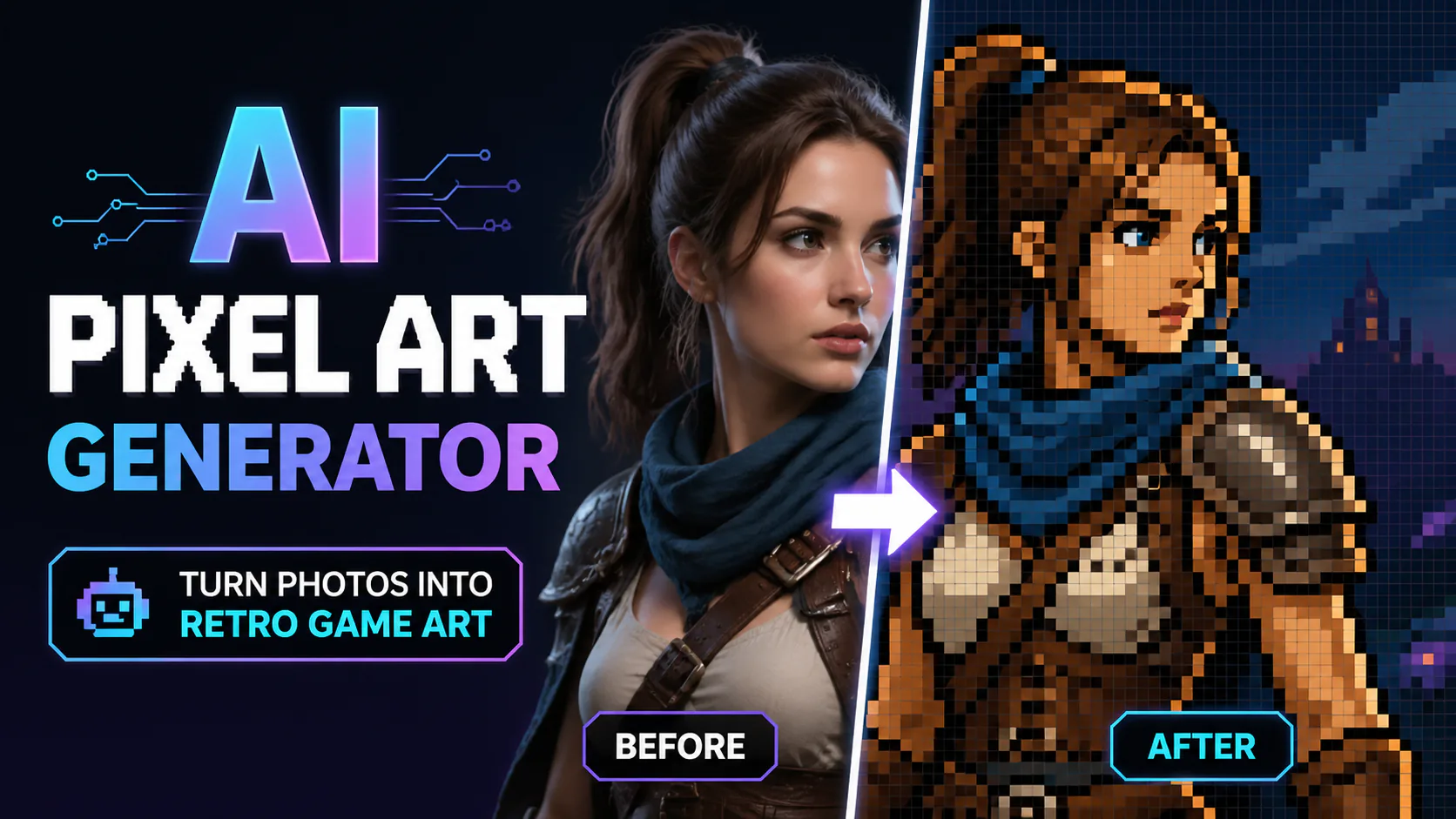
Transform your photos into pixel art with AI-powered style conversion.
AI Pixel Art

Related AI tools

  • AI Vaporwave Generator

    AI Vaporwave Generator

    Create retro-inspired edits, synthwave posters, profile visuals and music-cover concepts. Describe neon grids, sunset colours, VHS textures and surreal details to guide the composition.

  • Y2K Filter

    Y2K Filter

    Upload a photo and explore neon, chrome, bubblegum and holographic Y2K styles. Choose a look, generate with account credits and review the result.

  • Oil Painting

    Oil Painting

    Turn your photos into oil-painting-style images with visible brushstrokes and canvas texture.

  • AI Watercolour Generator

    AI Watercolour Generator

    Turn ordinary photos into soft watercolour portraits, card designs, wall art concepts or social visuals. Ask for paper texture and flowing pigment edges for a hand-painted look.

AI Pixel Art

Turn a Photo into Pixel Art with AI

Use an image model to reinterpret a photo as pixel art. Upload your image, choose a preset such as 8-bit, 16-bit, 32-bit, isometric or chibi, and describe the look you want. The result depends on the selected model and prompt, so review it before using it as a game sprite, profile image or retro-inspired design.

AI Pixel Art
AI Pixel Art

Explore Pixel Art Styles from a Photo

Pixel art can be made pixel by pixel, or explored by asking an image model to reinterpret a reference photo. Upload an image, choose a preset and describe the look you want. Review the generated result, which can vary with the model and prompt.

Multiple Pixel Styles

Explore 8-bit, 16-bit and 32-bit looks, as well as isometric and chibi presets, to guide the style of your photo-to-pixel-art transformation.

Pixel-art look

Presets and prompts can guide the apparent pixel scale, from bold, chunky shapes to finer-looking detail. The output depends on the selected model; pixel density may not be directly adjustable.

Versatile Applications

Explore ideas for game sprites, profile images, social graphics and retro-inspired designs using a photo as a reference. Check the model’s terms for applicable usage rights.

AI Pixel Art

How to Turn a Photo into Pixel Art

Sign in, upload a photo, choose a pixel-art preset and describe the look you want. Select a supported model and check its available settings and credit cost before generating. The model reinterprets the reference image, and the result may vary; review it for clear shapes, colours and details before use.

FAQ

FAQ

Pixel art conversion uses an image model to reinterpret an uploaded photo or image with a pixelated, retro-inspired look. The result depends on the selected model and prompt.

Choose from the available presets: 8-bit Classic, 16-bit Retro, 32-bit Modern, Isometric and Cute Chibi. Results depend on the selected model and prompt.

The presets guide the pixel-art look, but pixel size or density may not be directly adjustable. The result depends on the selected model and prompt.

You can upload a photograph or digital artwork as a reference. How closely the result follows the source depends on the selected model and prompt.

Output dimensions depend on the selected model and its available resolution options. Check the model settings before generating.

Generation time varies with the selected model and current service conditions; no completion time is guaranteed.

You can explore pixel-art looks for game sprites, social media graphics and other projects. Check the selected model’s terms for applicable usage rights.

The model may reinterpret or simplify parts of the source. Check the result for details that matter to your project.

Illustrative projectTry the 8-bit preset with a reference photo to explore a retro game sprite look. Review the result for shape and detail before using it in a game.
Illustrative projectTry the Cute Chibi preset with a character design to explore a small, colourful pixel-art version. The result depends on the source image, model and prompt.
Illustrative projectUse a reference image and a retro pixel-art prompt to explore an emote concept. Check the result at its intended display size.
Illustrative projectTry the Isometric preset with a reference image to explore a pixel-art visual for an infographic or presentation. Review clarity and legibility at the final size.
Illustrative projectTry the 16-bit Retro preset to explore a nostalgic pixel-art treatment for a digital art project. Results vary with the source image and prompt.
Illustrative projectUse a reference image and a pixel-art prompt to explore icons for a retro-inspired interface. Check each result for consistency and legibility.
Pixel Art Project Ideas

Pixel Art Project Ideas

Explore creative examples
Illustrative projectTry the 8-bit preset with a reference photo to explore a retro game sprite look. Review the result for shape and detail before using it in a game.
Illustrative projectTry the Cute Chibi preset with a character design to explore a small, colourful pixel-art version. The result depends on the source image, model and prompt.
Illustrative projectUse a reference image and a retro pixel-art prompt to explore an emote concept. Check the result at its intended display size.
Illustrative projectTry the Isometric preset with a reference image to explore a pixel-art visual for an infographic or presentation. Review clarity and legibility at the final size.
Illustrative projectTry the 16-bit Retro preset to explore a nostalgic pixel-art treatment for a digital art project. Results vary with the source image and prompt.
Illustrative projectUse a reference image and a pixel-art prompt to explore icons for a retro-inspired interface. Check each result for consistency and legibility.
Illustrative projectA class project could use a reference image to explore a pixel-art portrait of a historical figure. Review the result for accuracy before presenting it as a depiction.
Illustrative projectExplore a pixel-art treatment for a social media graphic with the 32-bit Modern preset. Engagement depends on the content and audience.
Illustrative projectA class project could use a reference image to explore a pixel-art portrait of a historical figure. Review the result for accuracy before presenting it as a depiction.
Illustrative projectExplore a pixel-art treatment for a social media graphic with the 32-bit Modern preset. Engagement depends on the content and audience.
AI Models You May Like

AI Models You May Like

  • GPT Image 2
    Image

    GPT Image 2

    GPT Image 2 is an OpenAI image model for generating and editing images. It can render text in multiple languages and ...

  • Nano Banana Pro
    Image

    Nano Banana Pro

    Generate and edit images with Nano Banana Pro. Sign-in and account credits are required; review the displayed cost be...

  • Veo 3.1
    Video

    Veo 3.1

    Create videos from text prompts, animate an image or use video input in supported modes. Choose a generation mode and...

  • Sora 2
    Video

    Sora 2

    Create videos from text prompts or images with Sora 2. Choose from the available options, then review the displayed c...

  • Seedance 2.0
    Video

    Seedance 2.0

    ByteDance's AI video model combines text, images, video clips and audio in one prompt. Use its @-reference system to ...

Start Creating with Nano Banana Pro

Create stunning images today
Get Started
Nano Banana Pro
Nano Banana ProNano Banana Pro

Nano Banana Pro gives you access to advanced AI image models for creating professional-quality images.

Email
FAQShowcasesChangelogAPIManga ColorizerCyberpunk
العربيةDeutschEnglishEspañolFrançais繁體中文日本語한국어Bahasa MelayuTürkçeไทยTiếng ViệtPortuguês (Brasil)中文עבריתPolski
© 2026 Nano Banana Pro· All rights reserved
Privacy PolicyTerms of ServiceRefund PolicyRefund RequestAbout Us
HomeAI ToolsAssetsProfile