Nano Banana Pro
  • Home
  • Reviews
  • Assets
  • Pricing
AI Tools
AI ToolsLine Art ColorizerAI Comic GeneratorPhoto to Anime GeneratorLuxury Car PortraitAI Consistent Character GeneratorPhoto RestorationRemove BackgroundImage UpscalerAI ID PhotoAnime FilterManga Filter3D CartoonAI OutpaintingSketch to ImageWatermark RemoverPortrait FilterPixel ArtManga ColorizerManga TranslatorManga CleanerColoring Page GeneratorPersonalized Story BookChildren Book IllustrationImage to Line ArtGender SwapBody EditorSketch to 3DBald Filter1990s PortraitBuzz CutProfessional HeadshotGrey HairAI Studio PortraitY2K Style2D to 3DRemove WatermarkObject EraserOil PaintingWatercolorNeon GlowCyberpunkVaporwaveAI Tattoo GeneratorAI Kids WorksheetAI Action FigureAI Movie PosterAI HairstyleYounger SelfAI Product Photo GeneratorAI ClaymationAI Travel Photo Grid GeneratorDouble Exposure Travel Poster AI GeneratorAI Mini Me GeneratorAI Sketch to Image GeneratorKorean Glass Skin AIRainy Window AI PortraitCafé Aesthetic AI PhotoAI Virtual StagingAI Landscape DesignAI Logo GeneratorAI Packaging DesignAI Sticker GeneratorPlushie Design Sheet GeneratorPhoto Fail GeneratorCharacter Nail Generator
Nano Banana ProNano Banana Pro

AI Virtual Staging

Explore furnishings for an empty room: upload a room photo, choose the room type and furniture style, then generate a virtual-staging concept.

AI Virtual Staging

Related AI tools

  • AI Landscape Design

    AI Landscape Design

    Explore a garden concept from your yard photo. Choose how you want to use the space and a landscape style; review planting and paths before planning work.

  • AI Image Upscaler

    AI Image Upscaler

    Enhance image resolution up to 4K with AI-powered super-resolution technology.

AI Virtual Staging
AI Virtual Staging

What you can use it for

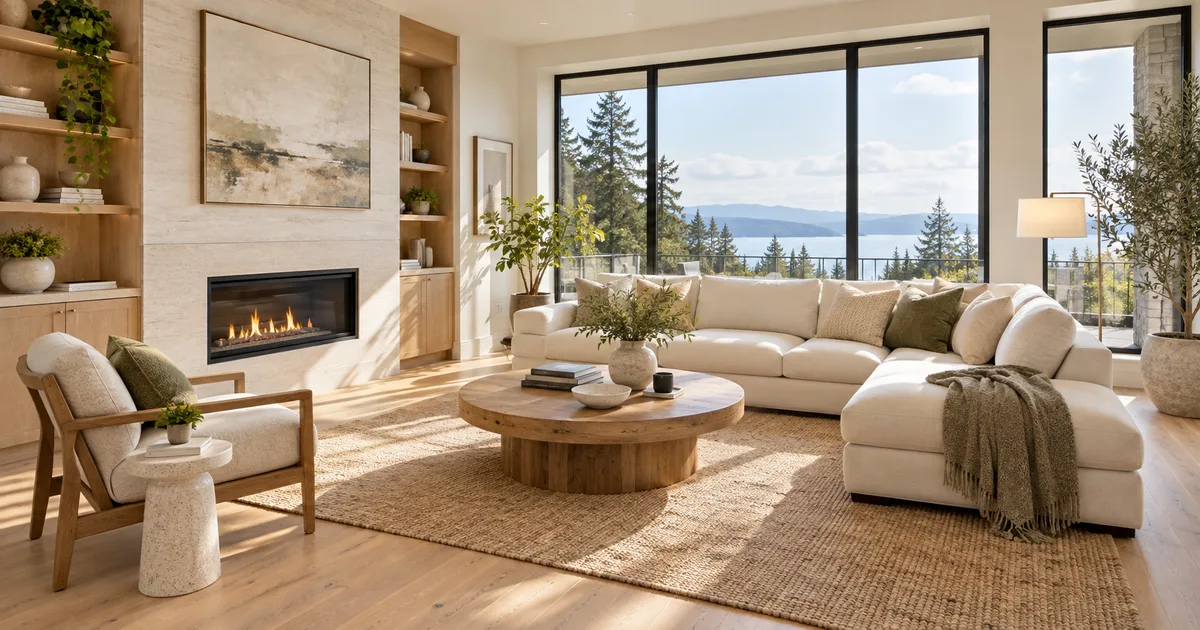
Help a buyer picture how an empty living room, bedroom or studio could be furnished. Start with one realistic furniture arrangement for the room’s intended use, rather than filling every corner with decorative objects. The goal is a clearer property presentation while keeping the photographed space recognizable.

Concept illustration, not a tested output from this tool

Explore furnishings for an empty room: upload a room photo, choose the room type and furniture style, then generate a virtual-staging concept.

AI Virtual Staging

Prepare a useful reference image

Photograph the room in even daylight with the floor, ceiling edges, doors and windows visible. A corner viewpoint usually explains the space better than a close crop. Avoid tilted walls, extreme wide-angle distortion and several room views merged into one image; the model needs one clear spatial reference.

AI Virtual Staging

From your reference to a design concept

Choose the two options below, check the model and credit amount, then generate a first concept. Compare it with the reference before changing one setting at a time.

Room type

Living room · Bedroom · Studio

Furniture style

Modern · Scandinavian · Warm natural · Minimal

AI Virtual Staging

Three ready-to-select directions

These are suggested option combinations to explore, not tested results. Select the matching settings in the form; there is no prompt to copy.

AI Virtual Staging

Living room · Scandinavian

Room type: Living room · Furniture style: Scandinavian

Bedroom · Warm natural

Room type: Bedroom · Furniture style: Warm natural

Studio · Minimal

Room type: Studio · Furniture style: Minimal

AI Virtual Staging

Review the details before using the result

Check that doors still open, windows keep their positions and the furniture does not block access. Look at sofa depth, bed scale, table legs and contact shadows. If the room is small, fewer pieces often communicate its potential more clearly than a crowded arrangement.

AI Virtual Staging

Take the concept into your next step

Use a selected concept in a property presentation with a clear virtual-staging disclosure and keep the original room photo available. Confirm any listing platform’s requirements yourself. For a furniture purchase, measure the real room and check product dimensions separately.

FAQ

Practical questions before you start

An empty or lightly furnished room gives the clearest starting point. There is no dedicated furniture-removal or renovation setting here. Compare any changes to existing furniture with the original photo.

The task instructions ask the model to preserve the architecture, but that is not a geometric guarantee. Compare door openings, window frames and wall lines against the source photo before publishing.

Specify a few essential pieces, compact furniture and a clear path between the entrance and windows. Avoid asking for a sofa, dining set, desk and storage wall in the same small corner.

No. The image suggests an arrangement without measured dimensions. Check room measurements, access clearance and the dimensions of actual products before buying furniture.

Label it as virtually staged and follow the relevant listing rules. The generated furniture is illustrative and must not imply that the property is supplied with those items or that its condition has changed.

Choose the model and settings first, then check the credit amount shown beside the generation action. Different supported models and resolutions can have different costs; this page does not promise free or unlimited generation.

Choose an available aspect ratio that suits the reference and intended placement. Sizes and formats depend on the selected model. A larger image is still a visual concept, not a production design file.

Use the result panel to inspect and download the image. You can also check generation history if you leave the page while the task runs. Review the full image before sharing it or handing it to a designer.

AI Models

AI Models

  • GPT Image 2
    Image

    GPT Image 2

    OpenAI's most advanced image generation model with native Thinking Mode, 95%+ text rendering accuracy, web search dur...

  • Nano Banana Pro
    Image

    Nano Banana Pro

    Generate and edit images with Nano Banana Pro. Sign-in and account credits are required; review the displayed cost be...

  • Veo 3.1
    Video

    Veo 3.1

    Veo 3.1, released in October 2025 by Google DeepMind, delivers cinematic 1080p videos with native audio generation — ...

  • Sora 2
    Video

    Sora 2

    OpenAI's most advanced general video generation model — create high-quality videos from text prompts and images with ...

  • Seedance 2.0
    Video

    Seedance 2.0

    ByteDance's next-generation AI video model with the revolutionary @-reference system. Combine text, images, video cli...

Start Creating with Nano Banana Pro

Create stunning images today
Get Started
Nano Banana Pro
Nano Banana ProNano Banana Pro

Nano Banana Pro is an AI image generation platform providing access to advanced models for professional-quality output.

Email
FAQShowcasesChangelogAPIManga ColorizerCyberpunk
DeutschEnglishEspañolFrançais繁體中文日本語한국어Türkçe中文עבריתPolski
© 2026 Nano Banana Pro· All rights reserved
Privacy PolicyTerms of ServiceRefund PolicyRefund RequestAbout Us
HomeAI ToolsAssetsProfile