Nano Banana Pro
  • Home
  • Reviews
  • Assets
  • Pricing
AI Tools
AI ToolsLine Art ColorizerAI Comic GeneratorPhoto to Anime GeneratorLuxury Car PortraitAI Consistent Character GeneratorPhoto RestorationRemove BackgroundImage UpscalerAI ID PhotoAnime FilterManga Filter3D CartoonAI OutpaintingSketch to ImageWatermark RemoverPortrait FilterPixel ArtManga ColorizerManga TranslatorManga CleanerColoring Page GeneratorPersonalized Story BookChildren Book IllustrationImage to Line ArtGender SwapBody EditorSketch to 3DBald Filter1990s PortraitBuzz CutProfessional HeadshotGrey HairAI Studio PortraitY2K Style2D to 3DRemove WatermarkObject EraserOil PaintingWatercolorNeon GlowCyberpunkVaporwaveAI Tattoo GeneratorAI Kids WorksheetAI Action FigureAI Movie PosterAI HairstyleYounger SelfAI Product Photo GeneratorAI ClaymationAI Travel Photo Grid GeneratorDouble Exposure Travel Poster AI GeneratorAI Mini Me GeneratorAI Sketch to Image GeneratorKorean Glass Skin AIRainy Window AI PortraitCafé Aesthetic AI PhotoAI Virtual StagingAI Landscape DesignAI Logo GeneratorAI Packaging DesignAI Sticker GeneratorPlushie Design Sheet GeneratorPhoto Fail GeneratorCharacter Nail Generator
Nano Banana ProNano Banana Pro

AI Packaging Design

Explore a new packaging concept from a package reference. Choose a package format and visual style, then review graphics, folds and label space.

AI Packaging Design

Related AI tools

  • AI Logo Generator

    AI Logo Generator

    Explore a logo symbol from a sketch or visual reference. Choose a graphic style and palette, then review the raster concept at a small size.

  • AI Product Photo Generator

    AI Product Photo Generator

    AI Product Photo Generator helps you build marketplace product photos, ad creatives, and lifestyle ecommerce scenes from a basic item shot. Test white backgrounds, home scenes, premium surfaces, and seasonal campaign images before a full shoot.

  • AI Sticker Generator

    AI Sticker Generator

    Turn a pet, character or object reference into a sticker-style illustration. Choose an expression and drawing style, then review the silhouette.

AI Packaging Design
AI Packaging Design

What you can use it for

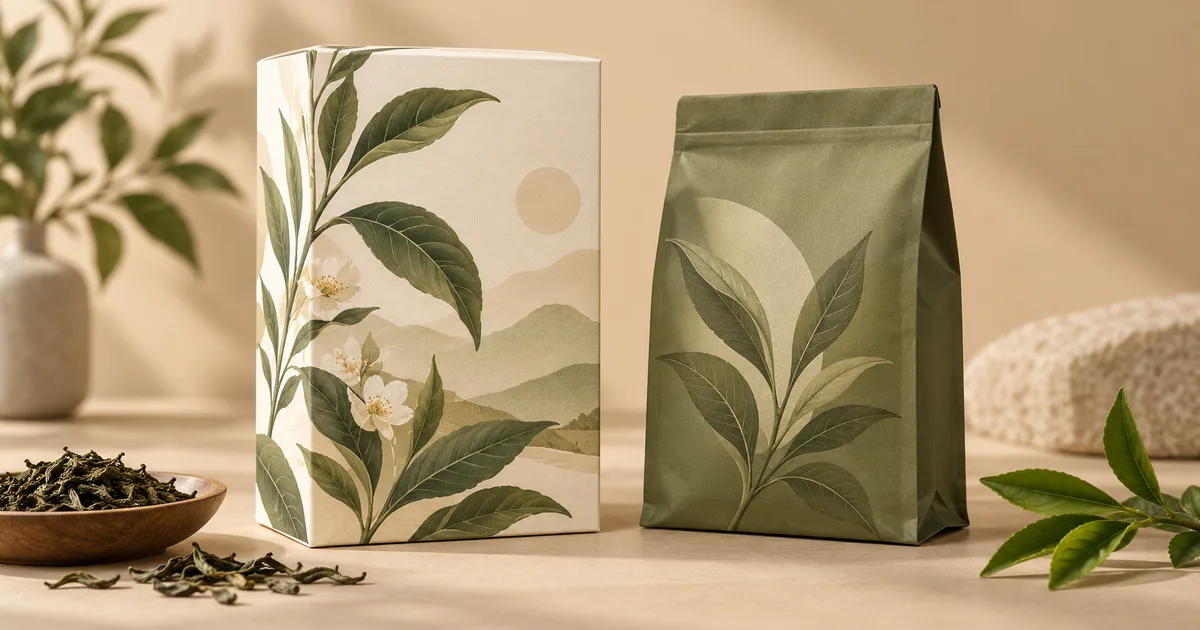
Develop a new visual direction for a box, pouch or other package. Use it to compare color, illustration and label-space ideas before commissioning production artwork. Unlike product photography, the purpose here is to explore a new package design rather than preserve an existing label exactly.

Concept illustration, not a tested output from this tool

Explore a new packaging concept from a package reference. Choose a package format and visual style, then review graphics, folds and label space.

AI Packaging Design

Prepare a useful reference image

Upload a blank or simply printed package with a clear shape. A front or three-quarter view helps show panels, folds and closures. Choose the package format and visual style in the form; product details must be handled separately when preparing accurate labels.

AI Packaging Design

From your reference to a design concept

Choose the two options below, check the model and credit amount, then generate a first concept. Compare it with the reference before changing one setting at a time.

Package format

Box · Stand-up pouch · Paper sleeve · Bottle label

Visual style

Minimal · Botanical · Playful · Restrained premium

AI Packaging Design

Three ready-to-select directions

These are suggested option combinations to explore, not tested results. Select the matching settings in the form; there is no prompt to copy.

AI Packaging Design

Box · Botanical

Package format: Box · Visual style: Botanical

Stand-up pouch · Playful

Package format: Stand-up pouch · Visual style: Playful

Paper sleeve · Restrained premium

Package format: Paper sleeve · Visual style: Restrained premium

AI Packaging Design

Review the details before using the result

Check panel proportions, folds, seams and whether artwork crosses edges awkwardly. Inspect every generated word and remove invented certifications or product claims. A realistic rendering does not confirm material performance, readable fine print or the dimensions of a manufactured pack.

AI Packaging Design

Take the concept into your next step

Use the image as a briefing mockup for a packaging designer. Build the final layout on the manufacturer’s approved dieline, add verified text and barcodes, and check print specifications. Obtain a physical proof before treating the concept as production artwork.

FAQ

Practical questions before you start

Use the package type you actually want to develop: box, pouch, sleeve or bottle. A blank reference with visible edges is preferable to a busy shelf photo, because the shape and panel layout are easier to interpret.

This tool explores changes to the package’s visual design. A product photo workflow aims to present an existing product while retaining its identity and label. Choose the latter when the current packaging must remain unchanged.

No. Generated copy can be incorrect, illegible or invented. Add approved product text, claims and ingredients in a layout application, then check every field before publication or printing.

No. The result is a visual mockup, without manufacturing dimensions, cut-and-fold paths or a verified barcode. Obtain those from your manufacturer and the relevant barcode process.

Use it as visual direction, not a print-ready file. A production designer still needs the dieline, color settings, bleed, safe areas, final text and a proof agreed with the printer.

Choose the model and settings first, then check the credit amount shown beside the generation action. Different supported models and resolutions can have different costs; this page does not promise free or unlimited generation.

Choose an available aspect ratio that suits the reference and intended placement. Sizes and formats depend on the selected model. A larger image is still a visual concept, not a production design file.

Use the result panel to inspect and download the image. You can also check generation history if you leave the page while the task runs. Review the full image before sharing it or handing it to a designer.

AI Models

AI Models

  • GPT Image 2
    Image

    GPT Image 2

    OpenAI's most advanced image generation model with native Thinking Mode, 95%+ text rendering accuracy, web search dur...

  • Nano Banana Pro
    Image

    Nano Banana Pro

    Generate and edit images with Nano Banana Pro. Sign-in and account credits are required; review the displayed cost be...

  • Veo 3.1
    Video

    Veo 3.1

    Veo 3.1, released in October 2025 by Google DeepMind, delivers cinematic 1080p videos with native audio generation — ...

  • Sora 2
    Video

    Sora 2

    OpenAI's most advanced general video generation model — create high-quality videos from text prompts and images with ...

  • Seedance 2.0
    Video

    Seedance 2.0

    ByteDance's next-generation AI video model with the revolutionary @-reference system. Combine text, images, video cli...

Start Creating with Nano Banana Pro

Create stunning images today
Get Started
Nano Banana Pro
Nano Banana ProNano Banana Pro

Nano Banana Pro is an AI image generation platform providing access to advanced models for professional-quality output.

Email
FAQShowcasesChangelogAPIManga ColorizerCyberpunk
DeutschEnglishEspañolFrançais繁體中文日本語한국어Türkçe中文עבריתPolski
© 2026 Nano Banana Pro· All rights reserved
Privacy PolicyTerms of ServiceRefund PolicyRefund RequestAbout Us
HomeAI ToolsAssetsProfile