Character Nail Generator
Explore a coordinated ten-nail design sheet inspired by a character’s colors, hair, eyes and outfit motifs.
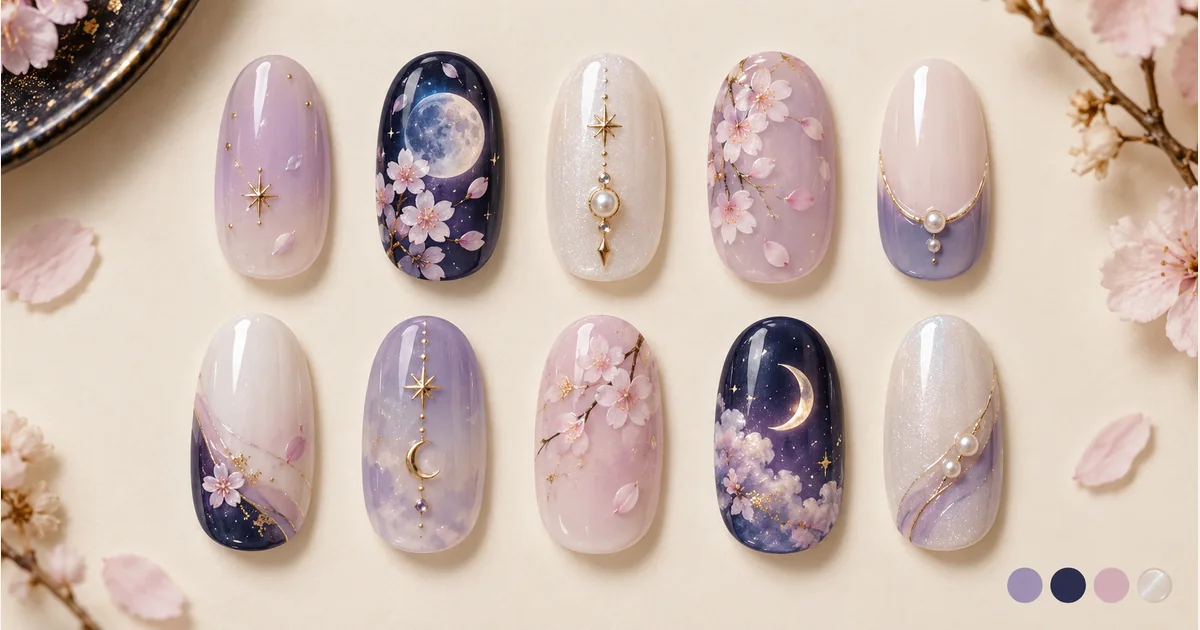

Explore a coordinated ten-nail design sheet inspired by a character’s colors, hair, eyes and outfit motifs.
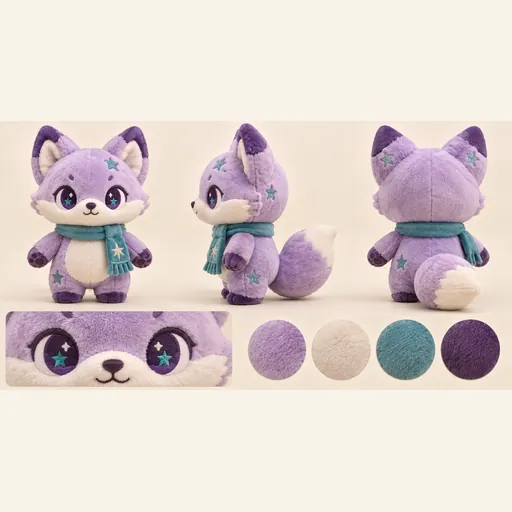
Turn one character reference into a plush toy concept sheet with front, side and back views, a face detail and a color palette.

Turn a pet, character or object reference into a sticker-style illustration. Choose an expression and drawing style, then review the silhouette.

Explore a logo symbol from a sketch or visual reference. Choose a graphic style and palette, then review the raster concept at a small size.
Use a character as inspiration for a ten-nail concept sheet. Hair and eye colors, costume accents and a few small symbols can produce a recognizable theme without putting a full portrait on every nail. The sheet is a starting point for discussing a set with a nail artist. AI-generated showcase artwork.
Pick an image where hair, eyes, costume and characteristic motifs are easy to distinguish. A clean reference is more useful than a tiny character inside a busy poster. Decide which two or three colors define the theme and which small symbol can still be read at actual nail size.
Upload your character reference, choose an available model and image settings, and check the displayed credits. Generate the design sheet, zoom in on the colors and motifs, then save your favorite idea to discuss with a nail artist.
Explore ten separate nail designs arranged in two rows of five. Two feature nails carry the strongest motifs, with simpler companion designs balancing the set. The image focuses on the nail shapes and character palette, without a hand in the scene.
View the sheet both enlarged and small to see which colors, lines and motifs you like. Simple symbols often read more clearly than tiny text or detailed faces. Bring a clear set of nail shapes to your artist and decide together which accents to keep or simplify.
Use the sheet to discuss shape, length, base colors and which fingers receive accent designs. Your artist should choose materials and adapt detail to your actual nails. This is a concept image, not ten printable decals, a salon instruction file or a promise of physical feasibility; the generated arrangement does not assign each design to a specific finger.
This is a theme design sheet of ten separate nails, useful for choosing colors and motifs. It does not provide a virtual manicure try-on for a photo of your hand.
Yes. Hair, eye and outfit colors can create a recognizable theme with a few small motifs. Two accents and simpler companion nails offer an alternative to drawing a portrait on every nail.
The design sheet uses two rows of five nail shapes. AI layouts can vary, so choose a version with clear, complete designs that you can discuss with your nail artist.
Not necessarily. The output is visual inspiration. Line thickness, nail length, materials and available techniques affect what can be done; ask your artist to simplify fine details and confirm the final plan.
It is not a print-ready decal template. Scale, transparency, cutting layout and printer or material requirements need separate preparation. Downloading a concept sheet does not produce a fitted ten-finger decal file.
Choose a model and image settings to see the credit amount beside the generation button. The amount can vary with the selected model and resolution; check it before submitting.
Choose from the aspect ratios and sizes available for your selected model. Match the image shape to where you want to display or share the result.
Use the result panel to inspect and download the image. You can also check generation history if you leave the page while the task runs. Review the full image before sharing it or handing it to a designer.